Testkube Audit Logs
Testkube records significant events in its internal Audit Log, providing Organization Owners and Admins with valuable insights into how Organization Members are using the platform.
These logs can help monitor usage patterns, identify security risks, and ensure compliance with internal policies.
Accessing Audit Logs
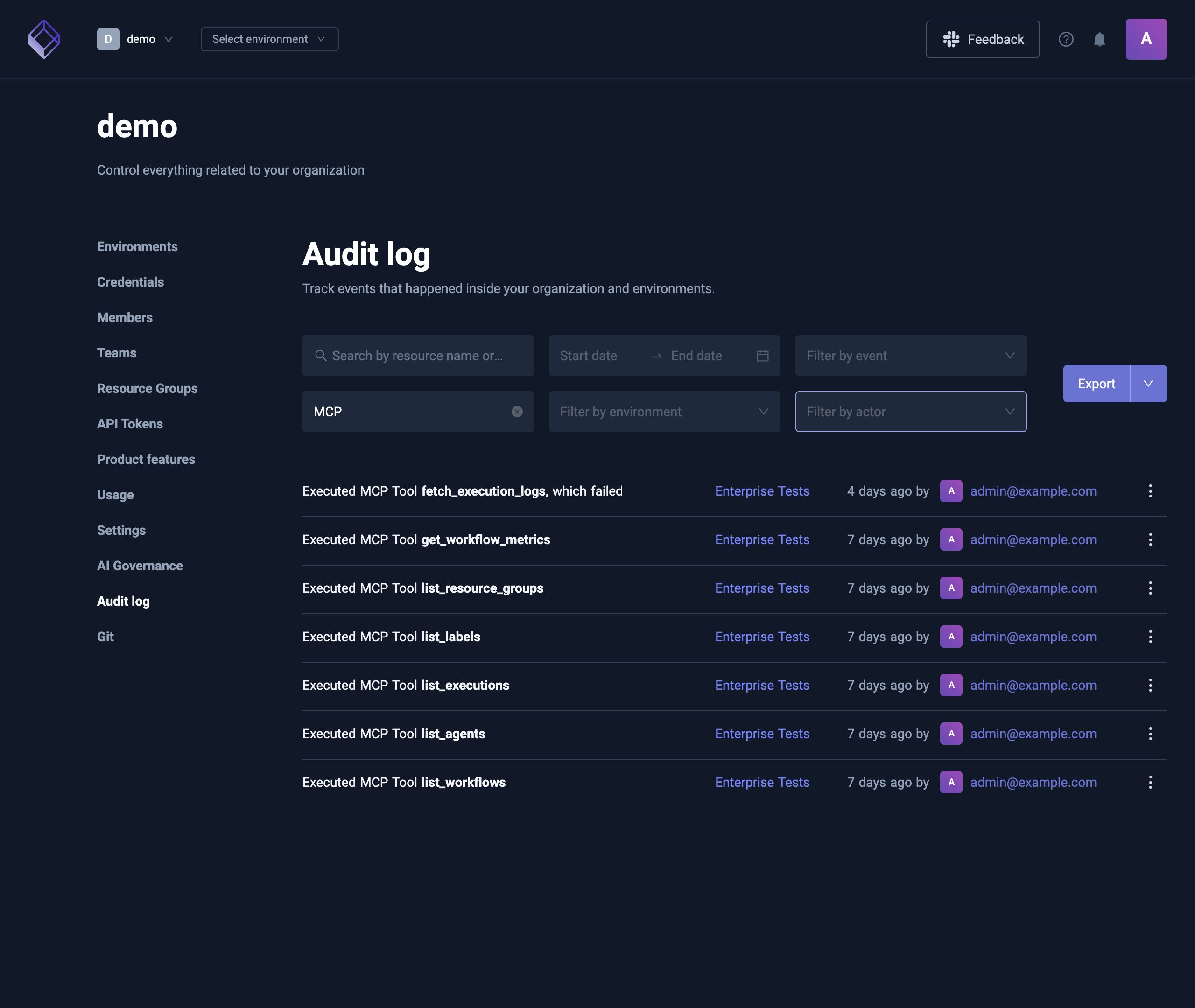
Audit Logs can be accessed via the Audit log menu item under the Organization Management page.
Here, Organization Owners and Admins can review detailed records of user actions.

Filtering Audit Logs
Events in the Audit Log can be filtered using various parameters to focus on specific actions or time frames:
- Search: Find events by the name or ID of the resource they changed.
- Date Range: Filter by the time period during which the events were recorded.
- Event Type: For example, filter for actions like Environment Deleted or Test Workflow Executed.
- Environment: Focus on a specific environment within the organization.
- Actor: Filter by the specific user or service that initiated the event.
- Source: Filter by where the event came from: UI, CLI, API Token, GitOps Agent or MCP. A call made with an API token through MCP has the MCP source.
Sharing a filtered view
The filters and the page you're on are kept in the URL, so a bookmarked or shared link opens the same view. For example, adding ?source=mcp to the Audit log's address shows only the events that came through MCP. Organization Management → AI Governance → Audit opens that view. That tab is only there for people who can see both AI Governance and the Audit log.
AI and MCP events
Each tool call through an Environment's MCP endpoint is recorded as an MCP Tool Called event. It records:
- The tool that was called, who called it, and the Environment.
- Whether the call succeeded, failed, or was refused before it ran (for example over a limit), and the reason, cut to 500 characters.
- How long the call took, for calls that ran.
- How the caller signed in: an API token or OAuth.
- The tool's identifier arguments, such as workflow, template, execution, file, Resource Group, report, board and insight series names or IDs, cut to 200 characters.
Workflow YAML, run configuration, tags, filters and log searches can hold secrets, so they're never recorded.
In the list, the event reads Executed MCP Tool followed by the tool's name, and ends with which failed when the call failed. Hover it for the reason. Refused calls don't show which failed.
Every event recorded while serving a tool call has the MCP source, including the actions the tool takes. A workflow run started through MCP is recorded as Test Workflow Executed with the MCP source, next to its MCP Tool Called event.
Exporting Audit Logs
Audit Logs can also be exported for further analysis. Supported formats are:
- CSV
- JSON
This makes it easy to integrate the audit log events with other reporting or analysis tools.

Retention Period
By default, audit log events are retained for 180 days. After this period, the logs are automatically cleaned up to optimize storage.
Console Logging
By default, Testkube does not emit audit events to the console. Turning this on can help with real-time debugging and monitoring—but may expose sensitive user data.
-
Enable Console Logging
Streams audit events to stdout. -
Anonymize User Information
When console logging is enabled, log only the user’s internal ID (not their username/email).
⚠️ Console logs can leak sensitive details. If you need privacy, enable anonymization.
See the Configuration section for the corresponding Helm parameters or environment variables.
Configuration
If you are using Testkube On-Prem, audit log settings can be configured during installation via Helm parameters:
- Retention Period: Customize the number of days to retain audit log events -
audit.cleanup.retentionPeriod(default:30) - Audit Log Cleanup: Control whether automatic cleanup is enabled -
audit.cleanup.enabled(default:true) - Cleanup Interval: Define how often the cleanup job runs, using a cron expression -
audit.cleanup.cronInterval(default:0 3 * * *) - Enable Console Logging: Toggle whether audit log events should also be logged to console -
audit.logger.enabled(default:false) - Anonymize User Information: If console logging is enabled and this toggle is enabled, audit log events console logs will only contain user ID and not username/email -
audit.logger.forceIdentifyUsersById(default:false)