Kubernetes Event Triggers
Testkube allows you to automate the execution of Test Workflows by defining triggers on certain events for various Kubernetes resources.
What is a Testkube Event Trigger?
In generic terms, a Trigger defines an action which will be executed for a given execution when a certain event on a specific resource occurs. For example, we could define a TestTrigger which runs a Test when a ConfigMap gets modified.
In Testkube, Event Triggers allow you to trigger the execution of a Workflow based on Kubernetes Events - for example, when a Deployment is updated or an Ingress gets deleted.
Beyond these built-in resources and events, a trigger can also watch your own custom resources, fire only when a specific field changes, and run on just the runners with the listener capability you choose.
You can currently create/manage Event Triggers in the Testkube Dashboard or by interacting with corresponding Trigger custom resources
via kubectl.
Creating Test Triggers
Select the Integrations tab (lightning bolt icon) on the left on the Testkube Dashboard to access the "Triggers" panel which shows a list of Triggers in your Environment.
The "Create a new trigger" on the right allows you to create a new trigger as described at create Test Triggers.
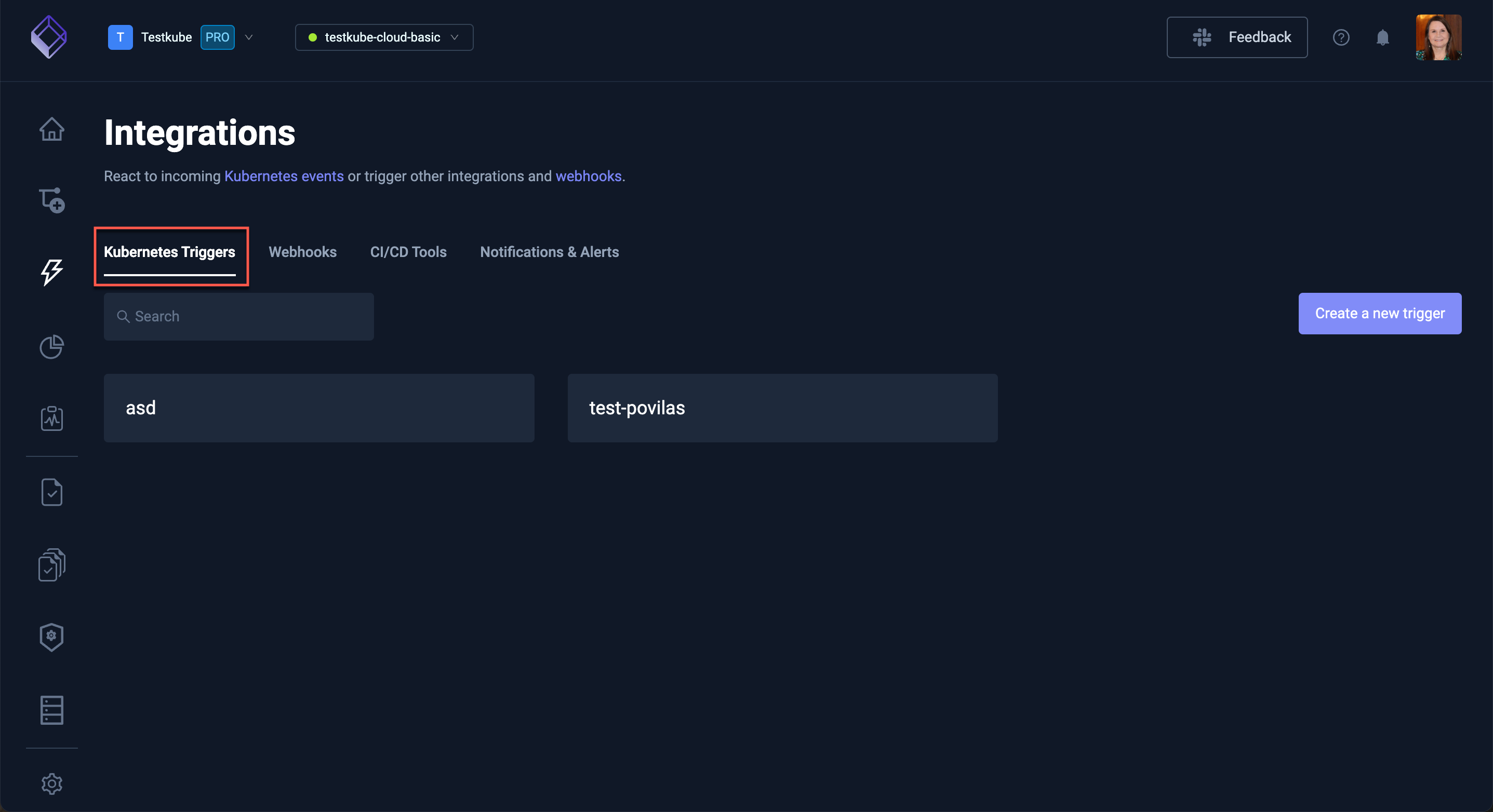
Triggers are ultimately defined as Customer Resources in your cluster - TestTrigger Reference
Listener capability with TestTriggers
Testkube uses runners with the listener capability to listen for Kubernetes events that will be matched against your TestTriggers. Your Testkube Environment can have any number of runners with the listener capability, deployed to whichever namespaces/clusters you need to listen for events.
The runner with the listener capability and Standalone Runner by default behave somewhat differently when it comes to listening for events:
- runners with the listener capability by default listen for events only in the namespace they are deployed to, if you need to listen for events from additional namespaces, you can configure this as described at Listening in additional namespaces.
- The Standalone Runner listens for events in all namespaces, you can configure this as described at Multi-namespace Runner Installation.
Listener event labels
Events captured by a specific runners with the listener capability are annotated with a number of testkube.io specific labels:
testkube.io/runner-name- the name of the runner with the listener capabilitytestkube.io/runner-namespace- the namespace of the runner with the listener capabilitytestkube.io/resource-name- the name of the resource triggering the eventtestkube.io/resource-namespace- the namespace of the resource triggering the eventtestkube.io/resource-kind- the kind (i.e.Deployment) of the resource triggering the eventtestkube.io/resource-group- the API group (i.e.apps) of the resource triggering the eventtestkube.io/resource-version- the API version (i.e.v1) of the resource triggering the event
See below how you can select on these labels to define Listener-specific trigger rules.
Custom Event Labels
During runner installation one can also specify custom labels which will be emitted with each event from the
runner with the listener capability by using the following values in the testkube-runner Helm chart:
listener:
  eventLabels:
    deployment-location: eastern-usa
Pinning a listener
By default every runner with the listener capability in your environment evaluates a trigger, and
whichever one sees a matching event fires it. That is usually what you want. To
have a trigger handled by specific listeners only, pin it with spec.listener:
spec:
  listener:
    match:
      id:
        - <listener-runner-id> # one or more listener runner IDs
Leave listener out to keep the default broadcast behavior. If you author YAML
directly you reference a listener by its runner ID; in the dashboard you pick
listeners by name instead (see below).
Pinning starts to matter once a trigger uses match conditions or watches a custom resource. Testkube checks your match paths against the schema the pinned listener reported for that resource, and a listener only knows about resources its ServiceAccount is allowed to watch (see Granting Testkube access to your CRDs). So a trigger with match conditions has to name at least one listener, and it should be one that can actually see the resource you are matching on.
In the dashboard this is the Listener(s) field at the top of the trigger form. Choosing a listener there also narrows the Custom Resource dropdown and the field autocomplete to what that listener can see.
Selectors
Triggers use selectors to determine which events should trigger the action and which workflows should be the target of the trigger action.
Event Selector
Each event that is emitted by a runner with the listener capability has labels on it which could be
used for selection of a triggering event using the selector field:
selector:
  matchLabels: map of key-value pairs
  matchExpressions:
    - key: label name
      operator: [In | NotIn | Exists | DoesNotExist
      values: list of values
Resource Selector
The resource and resourceSelector will be deprecated eventually but are still supported for now, please use the
selector field to match on the builtin labels such as teskube.io/resource-kind and testkube.io/resource-name to achieve similar
outcomes.
Using the fields resource and resourceSelector one can select the triggering
event by the source resource.
resource: Kinds of resources to match (possible values, `pod`, `deployment`, `statefulset`, `daemonset`, `service`, `ingress`, `event`, `configmap`)
resourceSelector:
  name: Kubernetes object name
  nameRegex: Kubernetes object name regex (for example, "app.*")
  namespace: Kubernetes object namespace (default is the runner's namespace)
  namespaceRegex: Kubernetes object namespace regex( for example, "test.*")
  labelSelector:
    matchLabels: map of key-value pairs
    matchExpressions:
      - key: label name
        operator: [In | NotIn | Exists | DoesNotExist
        values: list of values
Triggering on Custom Resources (CRDs)
Use resourceRef to trigger on any Kubernetes resource — including custom
resources like Argo Rollouts, Crossplane claims, Strimzi KafkaTopic, or
your own CRDs. You select the resource by its API Group, Version, and Kind:
resourceRef:
  group: argoproj.io # the API group; use "" for core resources like Pod or Service
  version: v1alpha1 # the API version
  kind: Rollout # the resource kind
resourceRef and the older resource field both pick what the trigger
watches — set one, not both. Use resource for common built-ins (pod,
deployment, etc.) and resourceRef for everything else.
In the dashboard, first pick the listener(s) that should watch the resource (see Pinning runners with the listener capability), then choose Custom Resource in the K8s resource dropdown. The Group / Version / Kind selectors are populated from what those listeners can actually watch, so a resource only appears once a listener with access to it is selected.
To narrow a custom-resource trigger to specific names, namespaces, or labels, use the same selectors you would for a built-in resource.
Granting Testkube access to your CRDs
Testkube's listener watches a curated set of built-in Kubernetes resources
out of the box. To trigger on a custom resource, you need to grant the
listener get, list, and watch access to it.
The easiest way is to add the resources to your Helm values when you install
or upgrade the testkube-api chart:
# values.yaml
rbac:
  extraWatchedResources:
    - apiGroups: ["argoproj.io"]
      resources: ["rollouts"]
    - apiGroups: ["cert-manager.io"]
      resources: ["certificates", "certificaterequests"]
    - apiGroups: ["kafka.strimzi.io"]
      resources: ["kafkatopics"]
resources takes the lowercase, plural API name (rollouts), which is not the
same as the kind you set in resourceRef (Rollout). Run
kubectl api-resources if you are unsure of the right name.
Each entry follows the same shape as Kubernetes RBAC rules. verbs is
optional and defaults to ["get", "list", "watch"] — the listener never
modifies the watched resource, only observes it. The chart applies these
rules to every namespace it watches, so single-namespace, multi-namespace,
and cluster-wide installations all work without extra configuration.
If you manage RBAC outside Helm, create an equivalent ClusterRole (or
namespace-scoped Role) granting get,list,watch on the resource and bind
it to the listener's ServiceAccount — by default testkube-api-server in
the testkube namespace.
Test Selector
The testSelector field could be used to select the target Workflow of the
trigger action.
testSelector:
  name: TestWorkflow name
  nameRegex: TestWorkflow name regex (for example, "test.*")
  labelSelector:
    matchLabels: map of key-value pairs
    matchExpressions:
      - key: label name
        operator: [In | NotIn | Exists | DoesNotExist]
        values: list of values
labelSelector.matchExpressions is supported for TestWorkflow target selection and follows the
standard Kubernetes label selector semantics.
Events
A trigger declares what it fires on with either event (a single event) or
events (a list of them). Exactly one of the two has to be set — a trigger
that sets both, or neither, is rejected.
Use event when the trigger watches for one thing:
spec:
  event: modified
Use events to fire on any of several events, instead of maintaining one
near-identical trigger per event:
spec:
  events:
    - created
    - modified
The list is an OR — the trigger fires when any of the listed events occurs. Everything else in the spec still has to hold exactly as it would for a single-event trigger: the selectors, match conditions, resource conditions and probes are all evaluated the same way, whichever event fired.
Rules that restrict which event a trigger may use apply to every entry in
events, not just one of them:
- With a
changed,changed_to, orchanged_frommatch condition, the list may containmodifiedand nothing else — those operators cannot mean anything on any other event. - A
contenttrigger may list only git events.
kubectl get testtriggers prints an Event column read from .spec.event,
so it is blank for a trigger that uses events. Run
kubectl get testtrigger <name> -o yaml to see the list.
Resource Conditions
Resource Conditions allows triggers to be defined based on the status conditions for a specific resource.
spec:
  conditionSpec:
    timeout: Duration in seconds the test trigger waits for conditions, until its stopped.
    delay: Duration in seconds the test trigger waits between condition checks.
    conditions:
      - type: test trigger condition type
        status: test trigger condition status, supported values - True, False, Unknown
        reason: test trigger condition reason
        ttl: test trigger condition ttl
Resource Probes
Resource Probes allows triggers to be defined based on the probe status.
spec:
  probeSpec:
    timeout: Duration in seconds the test trigger waits for probes, until its stopped.
    delay: Duration in seconds the test trigger waits between probes.
    probes:
      - scheme: test trigger condition probe scheme to connect to host, default is http
        host: test trigger condition probe host, default is pod ip or service name
        path: test trigger condition probe path to check, default is /
        port: test trigger condition probe port to connect
        headers: test trigger condition probe headers to submit
Match Conditions
Sometimes you only want a trigger to fire when a specific field changes — not on every event for the resource. Match conditions let you do that. Each entry inspects a single field on the watched object; the trigger fires only when all entries are satisfied.
Match conditions are validated against the schema a specific listener discovered, so a trigger that uses them must pin at least one listener.
For example, "fire when .status.phase becomes Healthy" or
"fire when .spec.paused is true":
spec:
  match:
    - path: .status.phase
      operator: changed_to
      value: Healthy
Each entry has three parts:
path— a dot-path to the field, like.status.phaseor.spec.replicas.operator— how to compare the field (see the table below).value— the value to compare against (required by some operators, not by others).
Operators
| Operator | Fires when… |
|---|---|
equals | the field currently equals value |
not_equals | the field currently does not equal value |
exists | the field is present on the object (no value needed) |
not_exists | the field is absent from the object (no value needed) |
changed | the field changed from any value to any other (requires event: modified) |
changed_to | the field changed to value (requires event: modified) |
changed_from | the field changed away from value (requires event: modified) |
changed, changed_to, and changed_from are only meaningful on update
events, so they require event: modified on the trigger. A trigger that uses
the events list must list modified and nothing else — one
unsatisfiable event rejects the trigger even alongside a valid one.
Tips
- Paths use dot notation and start with a leading dot —
.status.phase,.spec.template.spec.containers. Array indexing (containers[0],containers[*]) is not supported yet — match on scalar fields under arrays for now. equalsandnot_equalsonly work on scalar fields (strings, numbers, booleans). Useexists,not_exists, orchangedfor arrays and objects.- Numbers and booleans are compared as strings —
value: "5"matches.spec.replicas: 5;value: "true"matches.spec.paused: true. - Not sure which fields a resource has? The dashboard autocompletes paths
from its live schema. When writing YAML by hand, inspect a live object with
kubectl get <resource> <name> -o yaml.
Targeting specific runners
With the introduction of runners you can optionally specify which runner(s) a Triggered execution should run on. For example
spec:
  ...
  target:
    match:
     - application: accounting
...
Will trigger an Execution on any Global runner with the application: accounting label, For more details,
see our guide on Runner targeting.
Template-based target selection
You can resolve values in target.match at runtime using Go templates or JSONPath.
- Run on the same runner that handled the event:
spec:
  action: run
  actionParameters:
    target:
      match:
        name:
          - "{{ .Agent.Name }}"
- Target by runner labels (e.g., environment):
spec:
  action: run
  actionParameters:
    target:
      match:
        group:
          - '{{ index .Agent.Labels "env" }}'
Note: Add/update runner labels via CLI: testkube update runner <runner-name> --label env=eu-west1.
- Provide custom event labels via environment variable and reference them in templates:
env:
  - name: EVENT_LABELS
    value: cluster:dev
Then reference in a template as {{ index .EventLabels "cluster" }}.
Tip: To inspect the full event data, run the runner with DEBUG=true.
Available template fields (Go templates and JSONPath):
Runner.Name(string)Runner.Labels(map) — access with{{ index .Runner.Labels "<key>" }}EventLabels(map) — includes auto-populated keys:testkube.io/runner-name,testkube.io/runner-namespacetestkube.io/resource-name,testkube.io/resource-namespacetestkube.io/resource-kind,testkube.io/resource-group,testkube.io/resource-version- plus any pairs from
EVENT_LABELS, e.g.,cluster:dev→{{ index .EventLabels "cluster" }}
Namespace(string) — namespace of the resource that emitted the eventObject— the full Kubernetes object for the event
JSONPath scope:
- In
actionParameters, JSONPath is evaluated against the resource object, so fields can be referenced directly, e.g.,jsonpath={.metadata.name}. - In
target.match, JSONPath is evaluated against the full event. To reach resource fields, prefix with.Object, e.g.,jsonpath={.Object.metadata.name}. To reach runner or labels:jsonpath={.Runner.Name}orjsonpath={.EventLabels.cluster}.
Action Parameters
Action parameters are used to pass config and tag values to the workflow execution. You can specify either text values or
jsonpath expression in a form of jsonpath={.metadata.name}. The data will be taken from the resource object of the trigger event.
Check the Kubernetes docs JsonPath Expression.
Also you can use Golang template syntax we support for Webhook processing and take data from Golang object fields.
spec:
  actionParameters:
    config: map of key-value pairs
    tags: map of key-value pairs
for example:
spec:
  actionParameters:
    config:
      environment: production
      datavalue: jsonpath={.data.test} # if the resource object is a configmap with key `test`
      labels: "{{ .ObjectMeta.Labels }}"
    tags:
      workflow: core
      trigger: jsonpath={.metadata.namespace} # namespace of the resource object
      name: "{{ .ObjectMeta.Name }}"
Supported Values
- Resource -
pod,deployment,statefulset,daemonset,service,ingress,event,configmap,content - Action -
run - Event / Events -
created,modified,deleted- For deployments -
deployment-scale-update,deployment-image-update,deployment-env-update,deployment-containers-modified,deployment-generation-modified,deployment-resource-modified - For git content -
git-push,git-tag-push,git-pull-request - For Testkube events -
event-queue-testworkflow,event-start-testworkflow,event-end-testworkflow-success,event-end-testworkflow-failed,event-end-testworkflow-aborted,event-created,event-updated,event-deleted eventtakes one of these values,eventstakes a list of them — see Events
- For deployments -
- Execution -
testworkflow - ConcurrencyPolicy -
allow,forbid,replace
Examples
On Deployment Update
Here is an example for a Test Trigger default/testtrigger-example which runs the TestWorkflow frontend/sanity-test when a deployment containing the label testkube.io/tier: backend gets modified and also has the conditions Progressing: True: NewReplicaSetAvailable and Available: True.
apiVersion: tests.testkube.io/v1
kind: TestTrigger
metadata:
  name: testtrigger-example
  namespace: default
spec:
  selector:
    matchLabels:
      testkube.io/resource-kind: Deployment
      testkube.io/tier: backend
  event: modified
  conditionSpec:
    timeout: 100
    delay: 2
    conditions:
      - type: Progressing
        status: "True"
        reason: "NewReplicaSetAvailable"
        ttl: 60
      - type: Available
        status: "True"
  probeSpec:
    timeout: 50
    delay: 1
    probes:
      - scheme: http
        host: testkube-api-server
        path: /health
        port: 8088
        headers:
          X-Token: "12345"
      - host: testkube-dashboard
        port: 8080
  action: run
  execution: testworkflow
  concurrencyPolicy: allow
  testSelector:
    name: sanity-test
    namespace: frontend
  disabled: false
On ConfigMap Creation or Update
A trigger that has to react to more than one event lists them under events
rather than being duplicated once per event. Here the config-validation
workflow runs whenever a ConfigMap labelled testkube.io/watch: "true" is
either created or modified:
apiVersion: tests.testkube.io/v1
kind: TestTrigger
metadata:
  name: testtrigger-configmap-changed
  namespace: default
spec:
  selector:
    matchLabels:
      testkube.io/resource-kind: ConfigMap
      testkube.io/watch: "true"
  events:
    - created
    - modified
  action: run
  execution: testworkflow
  testSelector:
    name: config-validation
    namespace: default
  disabled: false
On an Argo Rollout becoming Healthy
A common pattern with Argo Rollouts
is to run smoke tests every time a Rollout finishes a successful update. The
trigger below watches the Rollout custom resource and runs the
rollout-smoke-tests workflow whenever a rollout transitions to the
Healthy phase:
apiVersion: tests.testkube.io/v1
kind: TestTrigger
metadata:
  name: testtrigger-rollout-healthy
  namespace: default
spec:
  resourceRef:
    group: argoproj.io
    version: v1alpha1
    kind: Rollout
  listener:
    match:
      id:
        - <listener-runner-id> # a listener that can watch Rollouts
  event: modified # changed_to / changed_from / changed require this
  match:
    - path: .status.phase
      operator: changed_to
      value: Healthy
  action: run
  execution: testworkflow
  testSelector:
    name: rollout-smoke-tests
    namespace: default
  disabled: false
Because it uses match conditions, the trigger pins a listener via
spec.listener (see Pinning runners with the listener capability); use
the ID of a listener that can watch Rollouts. Before the trigger can fire,
grant that listener access to watch Rollouts by adding the resource to your
Helm values:
# values.yaml
rbac:
  extraWatchedResources:
    - apiGroups: ["argoproj.io"]
      resources: ["rollouts"]
See Granting Testkube access to your CRDs for more on this field.
On Testkube Cluster Event
You can define Test Trigger for Testkube cluster events. In below example,
if TestWorkflow k6-executor-smoke is completed successfully, then we run
TestWorkflow postman-smoke-tests
apiVersion: tests.testkube.io/v1
kind: TestTrigger
metadata:
  name: testtrigger-event
  namespace: testkube
spec:
  selector:
    matchLabels:
      testkube.io/resource-kind: Event
      testkube.io/resource-name: k6-smoke-test
  event: event-end-test-success
  action: run
  actionParameters:
     config:
      environment: production
    tags:
      trigger: jsonpath={.metadata.name}
 execution: testworkflow
  testSelector:
    name: postman-smoke-tests
    namespace: testkube
Disabling Test Triggers
Disabling test triggers can be helpful to test your configuration during the development. Testkube lets you disable them via
the API or modifying the CRD directly specifying disabled field value as true.
By default, test triggers are enabled on creation.
Architecture
Testkube uses Informers to watch Kubernetes resources and register handlers on certain actions on the watched Kubernetes resources.
Informers are a reliable, scalable and fault-tolerant Kubernetes concept where each informer registers handlers with the Kubernetes API and gets notified by Kubernetes on each event on the watched resources. Only the super-runner is able to register handlers with a Kubernetes API server, limiting our watched resources to the cluster in which the super-runner is deployed.
API
Testkube exposes CRUD operations on test triggers in the REST API. Check out the OpenAPI docs for more info.