Testkube Marketplace
The Testkube Marketplace is a community-driven collection of reusable TestWorkflows for validating infrastructure components in Kubernetes environments. It provides pre-built, security-vetted workflows for common infrastructure such as databases, message brokers, networking, storage, and more — ready to deploy and run in minutes.
Available Categories
The Marketplace organizes workflows by infrastructure type:
| Category | Components | Examples |
|---|---|---|
| Databases | PostgreSQL, MySQL, MongoDB, Redis | Connectivity checks, health validation |
| Messaging | Kafka, RabbitMQ, NATS | Broker connectivity, topic validation |
| Networking | Ingress controllers, Service mesh | Endpoint health, ingress validation |
| Storage | MinIO, Elasticsearch, Persistent Volumes | PVC binding, attachment checks |
| Observability | Prometheus, Grafana, Jaeger | Monitoring stack validation |
| Security | Vault, cert-manager | Certificate and secret management checks |
| Kubernetes Core | Pods, StatefulSets, Namespaces | Resource health, namespace scoping |
Using the Marketplace from the Dashboard
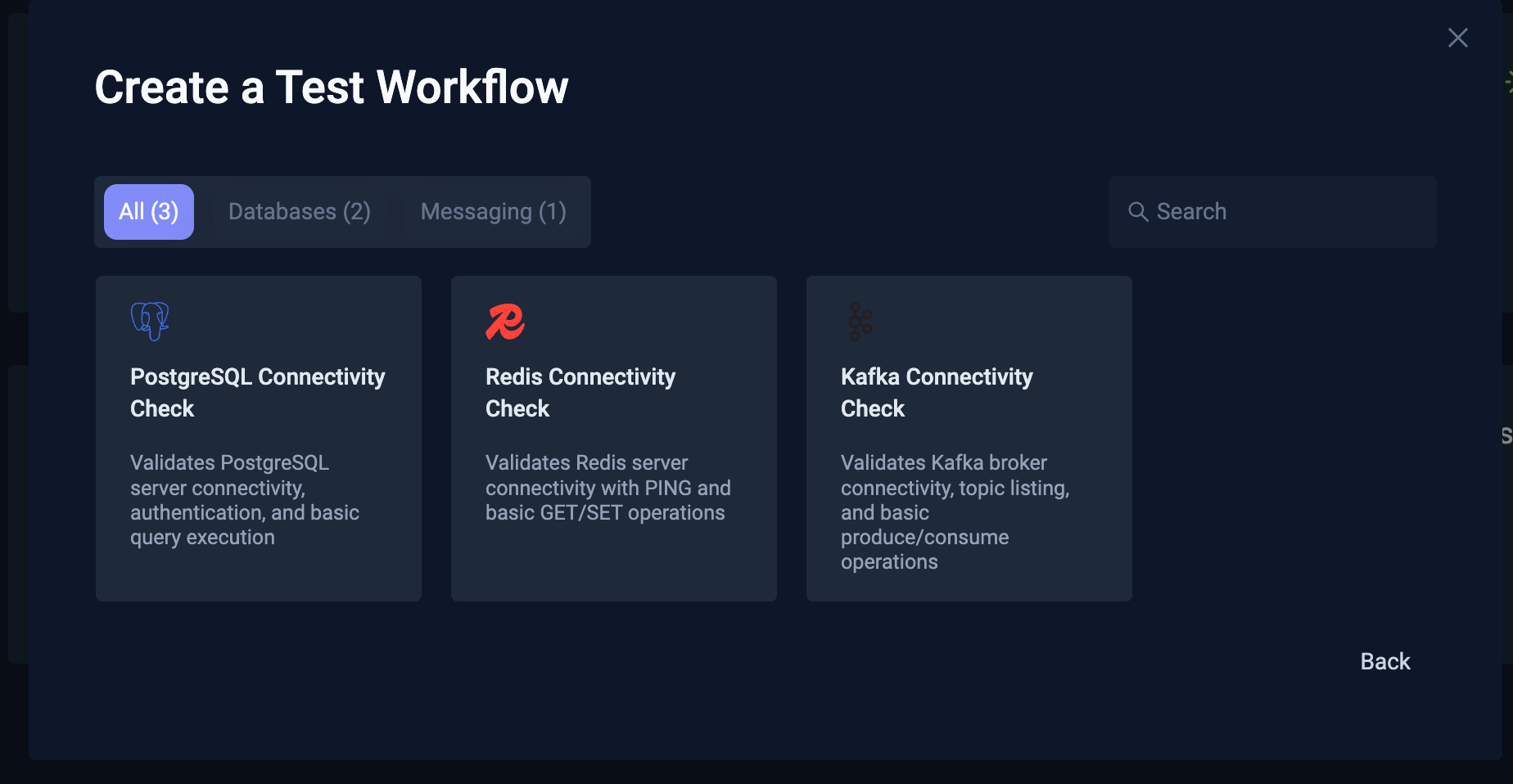
The Testkube Dashboard includes a built-in wizard for browsing and importing workflows directly from the Marketplace When creating a new TestWorkflow, select "Create from Marketplace" to browse available workflows, see their documentation, and configure parameters before deploying - see Create From Catalog for more details.
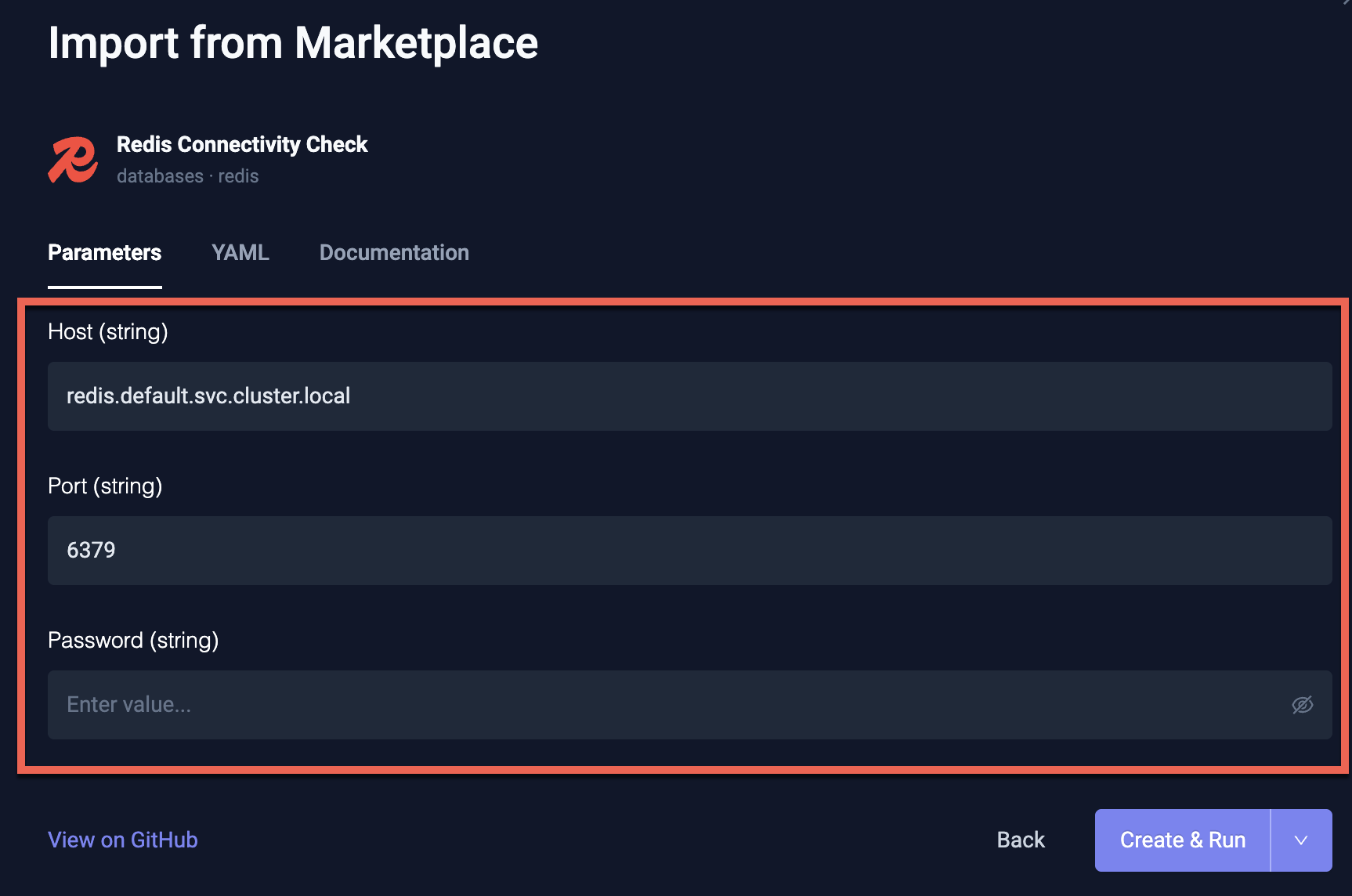
Each Marketplace Workflow includes configurable parameters that are rendered in the Dashboard when importing, letting you customize connection details, credentials, and other settings for your environment.
Using the Marketplace from the CLI
The Testkube CLI ships with a built-in marketplace command group that talks to the same catalog the
Dashboard uses, so open-source users can browse and install workflows without leaving the terminal.
Browse the Catalog
Discover what categories exist before drilling into specific workflows:
testkube marketplace categories
List every workflow in the Marketplace, optionally filtered by category or component:
testkube marketplace list
testkube marketplace list --category databases
testkube marketplace list --component postgresql --output json
The default pretty output renders a table; use --output json|yaml|go (with --go-template) for
machine-readable formats.
Inspect a Workflow
get shows the catalog entry, the configurable parameters extracted from spec.config, and optionally
the raw YAML and readme:
testkube marketplace get redis-connectivity
testkube marketplace get redis-connectivity --show-yaml --show-readme
Install a Workflow
install downloads the workflow YAML, applies any --set key=value overrides to the matching
spec.config.<key>.default fields, and creates (or updates) the TestWorkflow in your cluster — the
same pipeline as testkube create testworkflow -f:
# Install with the workflow's defaults
testkube marketplace install redis-connectivity

# Override one or more parameters; values are written into spec.config defaults
testkube marketplace install redis-connectivity \
  --set host=my-redis.default.svc.cluster.local \
  --set port=6379

# When attached to a terminal, install prompts for every parameter the workflow
# exposes by default. --set values become the pre-filled default; empty input
# keeps the current value; sensitive parameters are read with masked input.
testkube marketplace install redis-connectivity

# Force non-interactive (use defaults + --set as-is) -- handy on a terminal
# when you know the overrides already cover everything you need.
testkube marketplace install redis-connectivity --interactive=false

# Validate without creating, or upsert an existing workflow
testkube marketplace install redis-connectivity --dry-run
testkube marketplace install redis-connectivity --update
Prompting is automatically skipped when stdin is not a terminal (CI, piped
input), so the same command works unattended in pipelines. Pass
--interactive=true (or -i) to force prompting even off a TTY.
Because --set (and any values collected interactively) rewrite the workflow's
defaults, subsequent testkube run testworkflow redis-connectivity calls do
not need to repeat --config overrides.
After a successful install the command asks whether to run the workflow immediately. Use
--run to skip the prompt and make the command fully automatable, or -f/--follow to
stream logs until the execution finishes:
# Install and run unattended (suitable for CI)
testkube marketplace install redis-connectivity --run=true

# Install only, do not prompt or run
testkube marketplace install redis-connectivity --run=false

# Install, run, and follow the execution (logs stream until completion;
# exit code matches the workflow's result)
testkube marketplace install redis-connectivity -f
-f implies --run=true when --run is not supplied; combine with --update to
reinstall-and-rerun an existing workflow in a single command.
Install Directly from a URL
testkube create testworkflow also accepts a --url flag that fetches a TestWorkflow YAML from any
HTTP(S) endpoint before validating and creating it. This works for raw GitHub URLs, internal storage,
or any other source:
testkube create testworkflow --url \
  https://raw.githubusercontent.com/kubeshop/testkube-marketplace/main/workflows/databases/redis/redis-connectivity.yaml
--url and --file are mutually exclusive.
Clone and Apply (Manual Workflow)
If you prefer working from a local checkout, the workflows can still be applied directly:
git clone https://github.com/kubeshop/testkube-marketplace.git
cd testkube-marketplace

kubectl apply -f workflows/databases/redis/redis-connectivity.yaml
# or
testkube create testworkflow -f workflows/databases/redis/redis-connectivity.yaml
Run with Custom Parameters at Execution Time
If you installed a workflow with the original defaults, you can still override parameters per-run:
testkube run testworkflow redis-connectivity \
  --config host=my-redis.default.svc.cluster.local \
  --config port=6379
Example: Redis Connectivity Check
Below is the Redis connectivity workflow from the Marketplace. It validates that a Redis server is reachable and operational by running PING, SET, GET, and DEL operations.
apiVersion: testworkflows.testkube.io/v1
kind: TestWorkflow
metadata:
  name: redis-connectivity
  labels:
    marketplace.testkube.io/category: databases
    marketplace.testkube.io/component: redis
    marketplace.testkube.io/validation-type: connectivity
  annotations:
    marketplace.testkube.io/display-name: "Redis Connectivity Check"
    marketplace.testkube.io/description: "Validates Redis server connectivity with PING and basic GET/SET operations"
    marketplace.testkube.io/icon: "https://cdn.simpleicons.org/redis"

spec:
  config:
    host:
      type: string
      default: "redis.default.svc.cluster.local"
      description: "Redis host address"
    port:
      type: string
      default: "6379"
      description: "Redis port"
    password:
      type: string
      default: ""
      sensitive: true
      description: "Redis password (leave empty if no auth)"
    db:
      type: string
      default: "0"
      description: "Redis database number"

  steps:
    - name: "Validate Redis Connectivity"
      run:
        image: docker.io/library/redis:7-alpine@sha256:ee64a64...
        shell: |
          echo "Target: {{ config.host }}:{{ config.port }}"

          REDIS_ARGS="-h {{ config.host }} -p {{ config.port }} -n {{ config.db }}"

          # PING test
          RESULT=$(redis-cli $REDIS_ARGS PING 2>&1)
          if [ "$RESULT" = "PONG" ]; then
            echo "✓ PING successful"
          else
            echo "✗ PING failed: $RESULT"
            exit 1
          fi

          # SET / GET / DEL operations
          TEST_KEY="testkube:validation:$(date +%s)"
          redis-cli $REDIS_ARGS SET "$TEST_KEY" "test-value" EX 60
          redis-cli $REDIS_ARGS GET "$TEST_KEY"
          redis-cli $REDIS_ARGS DEL "$TEST_KEY"

          echo "✓ Redis Connectivity Validation Passed"
All Marketplace workflows follow this pattern: standardized metadata labels and annotations for discovery, configurable parameters with sensible defaults, and clear pass/fail output.
Workflow Metadata
Marketplace workflows use standardized metadata so they can be indexed and filtered in the Dashboard:
Labels
| Label | Purpose | Values |
|---|---|---|
marketplace.testkube.io/category | Infrastructure type | databases, messaging, networking, storage, observability, security, other |
marketplace.testkube.io/component | Specific component | redis, postgresql, kafka, etc. |
marketplace.testkube.io/validation-type | What's being validated | connectivity, health, performance, security |
Annotations
| Annotation | Purpose |
|---|---|
marketplace.testkube.io/display-name | Human-readable name shown in the Dashboard |
marketplace.testkube.io/description | What the workflow validates |
marketplace.testkube.io/icon | Icon URL for UI display |
marketplace.testkube.io/tags | Search keywords |
Security
All workflows in the Marketplace follow strict security guidelines enforced by CI on every pull request:
- Approved registries only — images must come from vetted sources (Docker Hub official, Bitnami, Chainguard, etc.)
- Digest pinning — all images use immutable SHA256 digest references instead of mutable tags
- Automated validation — CI checks reject PRs that violate image security policies
Contributing
The Marketplace is open for community contributions. To add a new workflow:
- Fork the testkube-marketplace repository
- Add your workflow under the appropriate category in
workflows/ - Include the required metadata labels and annotations
- Ensure all images are from approved registries with digest pinning
- Add a
README.mdwith usage documentation - Submit a pull request
See the Contributing Guidelines for full details on naming conventions, image security requirements, and the PR checklist.