Advanced Workflow Orchestration
This Workflows functionality is not available when running the Testkube Runner in Standalone Mode - Read More
Overview
With Test Workflows it is possible to run downstream Test Workflows and Tests with execute operation, allowing you
to create a Workflow that orchestrates the execution of other Workflows, both in sequence and parallel.
The possibility to orchestrate the execution of other Workflows from within a Workflow gives you great flexibility in how you can use Testkube to modularize and execute your tests:
- Break down complex Workflows into smaller, reusable steps.
- Fetch input data before (i.e. by using
curl/wgetto download data, or fetching Git repository). - Run setup operations (i.e. start shared instance of database, or generate API key).
- Process the results (i.e. by notifying about the status).
- Run other tests based on the previous results. See Branching on an earlier Workflow.
- Trigger Workflows in other environments.
- Nest Workflows - Workflow triggering Workflow(s), triggering other Workflow(s).
- Run any number of Workflows both in sequence or parallel.
- Run Workflows based on labels - for dynamic selection of which Workflows to run.
execute Syntax
You have to use execute operation in the step, and provide definition of the Test Workflows to run - Schema Reference.
For each Workflow to execute, you have to provide its name and optionally config values.
Starting with Testkube 2.14.0, separate entries in the same execute.workflows block must have distinct execution references. An entry uses its as alias when provided; otherwise, it uses the Workflow name.
Existing Workflows that list the same Workflow more than once without distinct references will fail with duplicated execution reference. This validation applies even when the Workflow does not use execution() or share data between executions.
Before upgrading from 2.13.x, give repeated entries distinct aliases:
execute:
  workflows:
    - name: my-workflow
      as: my-workflow-a
    - name: my-workflow
      as: my-workflow-b
Aliases must also be distinct from the references of other entries in that block. A single entry expanded through count, matrix, or shards remains supported without assigning an alias to each instance.
This example runs two Workflows - example-distributed-k6 and example-sharded-cypress in parallel, providing configuration values for
the example-distributed-k6 Workflow:
apiVersion: testworkflows.testkube.io/v1
kind: TestWorkflow
metadata:
  name: example-test-suite
spec:
  steps:
    - execute:
        workflows:
          - name: example-distributed-k6
            description: Run {{ index + 1 }} of {{ count }}
            count: 2
            config:
              vus: 8
              duration: 1s
              workers: 2
          - name: example-sharded-cypress
The Testkube Dashboard contains a visual builder for creating Composite Workflows - Read More
Parallel / Sequential Execution
Using multiple execute steps in your Workflow allows you to orchestrate the execution of other Workflows both in parallel and in sequence. For example,
the below Workflow first runs the cure-with-nginx-service and junit5-junit Workflows in parallel, then the cypress-browsers-matrix and
nunit-junit-report workflows in sequence.
apiVersion: testworkflows.testkube.io/v1
kind: TestWorkflow
metadata:
  name: composite-workflow
spec:
  steps:
    - execute:
        workflows:
          - name: curl-with-nginx-service
          - name: junit5-junit
    - execute:
        workflows:
          - name: cypress-browsers-matrix
    - execute:
        workflows:
          - name: nunit-junit-report
Controlling the concurrency level
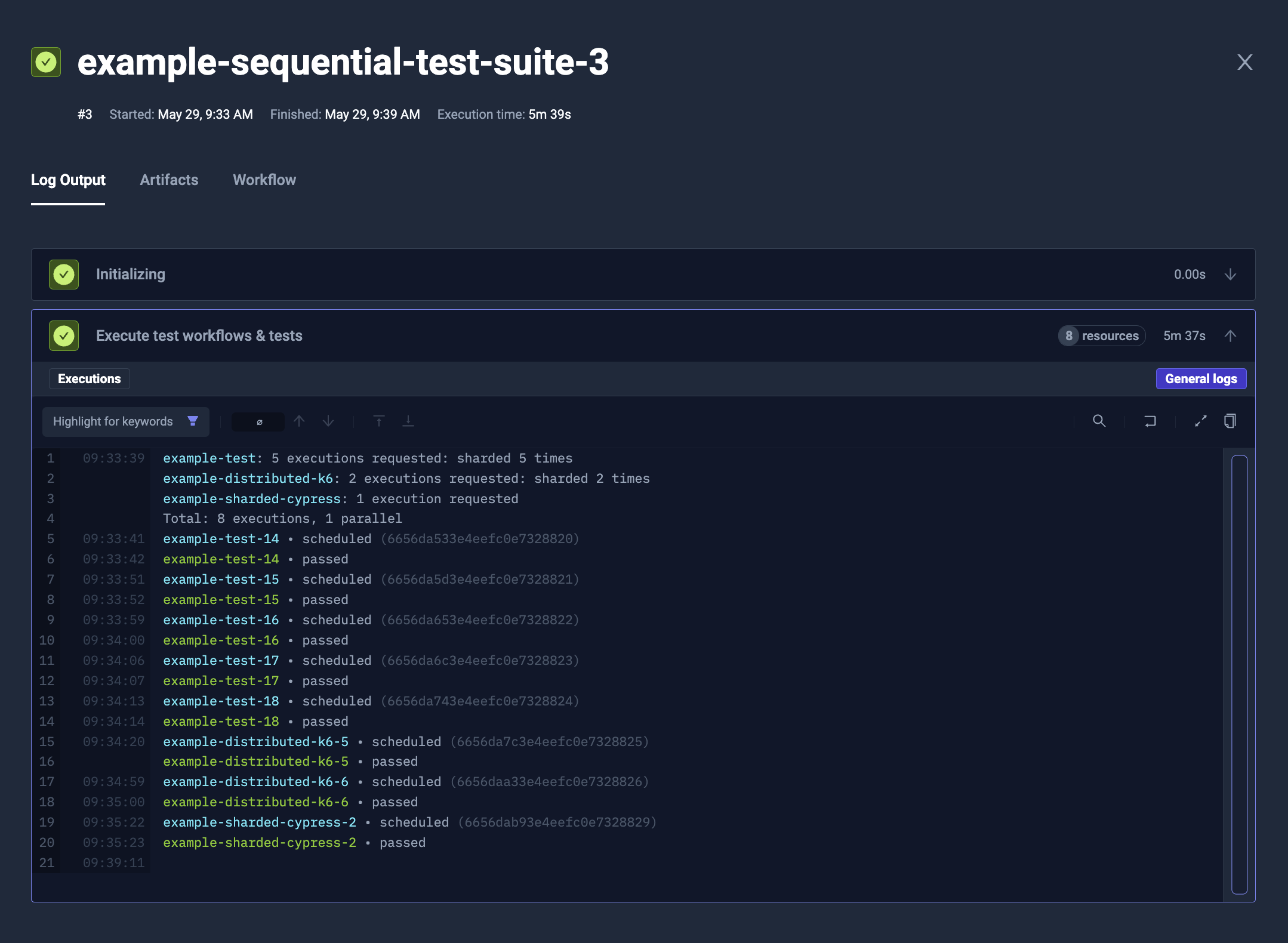
You can use parallelism property to control how many Test Workflows and Tests will be running at once.
In example, to run all the downstream jobs sequentially, you can use parallelism: 1.
It affects jobs instantiated by matrix and sharding properties (like count) too.
- YAML
- Log Output
apiVersion: testworkflows.testkube.io/v1
kind: TestWorkflow
metadata:
  name: example-sequential-test-suite
spec:
  steps:
    - execute:
        parallelism: 1
        workflows:
          - name: example-distributed-k6
            count: 2
            config:
              vus: 8
              duration: 1s
              workers: 2
          - name: example-sharded-cypress
        tests:
          - name: example-test
            count: 5
Dynamic workflow selection
In case you don't know an exact list of workflows to be executed inside of the suite, you can define it dynamically using test workflow labels. This list will be generated during test workflow execution. You have 2 options to choose:
Either using labels themselves
kind: TestWorkflow
apiVersion: testworkflows.testkube.io/v1
metadata:
  name: tw-suite-dynamic-labels
spec:
  steps:
    - execute:
        parallelism: 2
        workflows:
          - selector:
              matchLabels:
                core-tests: workflows
Or using Kubernetes label expressions
kind: TestWorkflow
apiVersion: testworkflows.testkube.io/v1
metadata:
  name: tw-suite-dynamic-expressions
spec:
  steps:
    - execute:
        parallelism: 2
        workflows:
          - selector:
              matchExpressions:
                - key: core-tests
                  operator: In
                  values:
                    - workflows
Targeting specific runners
With the introduction of runners it is possible to specify target runners for each
workflow specified in the execute command, for example:
...
- execute:
    workflows:
      - name: k6-base
        target:
          match:
            name:
              - load-runner-agent
      - name: e2e-test
Will run the k6-base test on a runner named load-runner-runner while running the e2e-test on the runner the containing
Workflow is running on. For more details, see our guide on Runner targeting.
Rerunning a previous execution
An entry can be scheduled as a rerun of an earlier execution rather than as a fresh one, by naming that execution's ID:
- execute:
    workflows:
      - name: e2e-test
        baseExecutionId: '{{ execution("first").id }}'
The scheduled execution then resolves execution("rerun") back to that one, which is what lets a Workflow read the previous run's report and repeat only the test cases that failed. See Rerunning Failed Tests for the full pattern, the difference from a rerun started on the CLI, and the rule on which executions may be named.
Branching on an earlier Workflow
A suite can run one Workflow after an earlier one passes, and a different Workflow after it fails. The suite's result is the result of the branch that ran.
The earlier Workflow publishes the result the branch should follow. Mark its test step optional: true, so that step's failure leaves the Workflow passed, and have a later step write the test step's own status to /testkube/outputs. The test step can publish how long it ran the same way. The suite reads both with execution().
apiVersion: testworkflows.testkube.io/v1
kind: TestWorkflow
metadata:
  name: postman-check
spec:
  content:
    git:
      uri: https://github.com/kubeshop/testkube
      revision: main
      paths:
        - test/postman/postman-executor-smoke-without-envs.postman_collection.json
  container:
    workingDir: /data/repo/test/postman
  steps:
    - name: Run Postman
      id: postman
      optional: true
      run:
        image: postman/newman:6-alpine
        shell: |
          start=$(date +%s)
          newman run postman-executor-smoke-without-envs.postman_collection.json
          code=$?
          echo -n "$(( $(date +%s) - start ))" > /testkube/outputs/durationSeconds
          exit $code
    - name: Publish the result
      shell: |
        echo -n '{{ step.postman.status }}' > /testkube/outputs/status
step.postman.status is passed, failed, or timeout. The Workflow result stays passed in each case, so the suite records this execution as passed and chooses the branch from the published status. durationSeconds is how many seconds the Postman step ran.
The suite copies those outputs into a step of its own. The following conditions read step.postman_result.outputs. execution() resolves in the shell step that performs the copy. See The Result of an Earlier Step and Sharing Data Between Executions.
apiVersion: testworkflows.testkube.io/v1
kind: TestWorkflow
metadata:
  name: branching-suite
spec:
  steps:
    - name: Run Postman
      execute:
        workflows:
          - name: postman-check
            as: postman

    - name: Record the Postman result
      id: postman_result
      shell: |
        echo -n '{{ execution("postman").outputs.status }}' > /testkube/outputs/status
        echo -n '{{ execution("postman").outputs.durationSeconds }}' > /testkube/outputs/durationSeconds

    - name: Run k6 after a passing Postman run
      condition: 'step.postman_result.outputs.status == "passed"'
      execute:
        workflows:
          - name: k6-on-pass

    - name: Run k6 after any other Postman result
      condition: 'step.postman_result.outputs.status != "passed"'
      execute:
        workflows:
          - name: k6-on-fail
as: postman is the name execution() uses for that run. k6-on-pass and k6-on-fail are ordinary Workflows. One of the two steps runs. The other is skipped, which leaves the suite result unchanged. The Postman Workflow passed, so the suite's result is the result of the k6 Workflow that ran. A failed or timeout Postman step takes the second branch.
Output values are strings. A condition that compares the duration converts it with int():
condition: 'step.postman_result.outputs.status == "passed" && int(step.postman_result.outputs.durationSeconds) < 60'
Nesting workflows
Workflows can be nested, a Workflow can execute other Workflow(s) executing other Workflow(s). Parallelism can then be used to control the execution flow.
Example:
Tool-specific workflow (in this case k6 - executing multiple workflows for different cases)
apiVersion: testworkflows.testkube.io/v1
kind: TestWorkflow
metadata:
  name: k6-workflow-suite
spec:
  steps:
    - execute:
        parallelism: 2
        workflows:
          - name: k6-workflow-smoke
          - name: k6-workflow-smoke-template
          - name: k6-workflow-smoke-template-without-checkout-step
          - name: k6-workflow-smoke-artifacts
          - name: distributed-k6-workflow-smoke
          - name: distributed-k6-workflow-smoke-artifacts
That can be executed from another workflow
kind: TestWorkflow
apiVersion: testworkflows.testkube.io/v1
metadata:
  name: tw-suite-full
spec:
  steps:
    - execute:
        parallelism: 2
        workflows:
          - name: artillery-workflow-suite
          - name: cypress-workflow-suite
          - name: gradle-workflow-suite
          - name: jmeter-workflow-suite
          - name: k6-workflow-suite # workflow from the example
          - name: maven-workflow-suite
          - name: playwright-workflow-suite
          - name: postman-workflow-suite
          - name: soapui-workflow-suite
Passing Input Parameters
Configuration parameters defined for a Workflow (see Parameterization) can be passed/overridden
when executing a Workflow as described above by adding a config property that specifies the desired values.
config passes data into an execution. To read data back out of one - the values it published, or the
artifacts it produced - see Sharing Data Between Executions.
In the below example the example-distributed-k6 Workflow is executed with specified values for vus, duration and workers parameters:
...
steps:
  - execute:
      workflows:
        - name: example-distributed-k6
          config:
            vus: 8
            duration: 1s
            workers: 2
Passing Specific files
It may happen that you will need to pass information from the file system. You can either pass the files using Test Workflow expressions (like file("./file-content.txt")) or using a tarball syntax.
You can easily use Test Workflow expressions to fetch some files and send them as a configuration variable:
apiVersion: testworkflows.testkube.io/v1
kind: TestWorkflow
metadata:
  name: example-test-suite-with-file-input
spec:
  content:
    git:
      uri: https://github.com/kubeshop/testkube
      revision: main
      paths:
        - test/k6/k6-smoke-test-without-envs.js
  steps:
    - execute:
        workflows:
          - name: example-distributed-k6
            config:
              vus: 8
              duration: 1s
              workers: 2
              script: '{{ file("/data/repo/test/k6/k6-smoke-test-without-envs.js") }}'
Multiple files transfer
To transfer multiple files, similarly to transfer in Parallel Steps,
you can use a tarball syntax that will pack selected files and return the URL to download them:
apiVersion: testworkflows.testkube.io/v1
kind: TestWorkflow
metadata:
  name: example-test-suite-with-file-input-packaged
spec:
  content:
    git:
      uri: https://github.com/kubeshop/testkube
      revision: main
      paths:
        - test/k6/k6-smoke-test-without-envs.js
  steps:
    - execute:
        workflows:
          - name: example-test-reading-files
            tarball:
              scripts:
                from: /data/repo
            config:
              input: "{{ tarball.scripts.url }}"
You can later use i.e. content.tarball to unpack them in destination test:
apiVersion: testworkflows.testkube.io/v1
kind: TestWorkflow
metadata:
  name: example-test-reading-files
spec:
  config:
    input: { type: string }
  content:
    tarball:
      - url: "{{ config.input }}" # extract provided tarball
        path: "/data/repo" # to local /data/repo directory (or any other)
  steps:
    - shell: tree /data/repo
Matrix and sharding
The execute operation supports matrix and sharding, to run multiple replicas and/or distribute the load across multiple runs.
It is supported by regular matrix/sharding properties (matrix, shards, count and maxCount) for each Test Workflow or Test reference.
You can read more about it in the general Matrix and Sharding documentation.